

May 14, 2025
How to Debug PHP Code
Debugging PHP code is valuable to developers as it assists in identifying and resolving issues in web applications with remarkable efficiency. By setting up error reporting, using appropriate debugging functions, and using supporting software such as Xdebug, programmers are able to locate problems quite rapidly.
For PHP developers, debugging is an essential task that, when mastered, can save a lot of time and effort while increasing application dependability.
This article will cover how to debug PHP code and all concerns regarding debugging methods, tools, and practices so that you can troubleshoot the many issues.
Understanding PHP Error Types
Before knowing the several debugging techniques, it is essential to understand the important types of PHP Web Development errors that you may encounter:
Syntax Error: Errors within the code that block the script from running.
Warning Errors: Error Types that don't cause the function to stop, but display hints of a possible issue.
Logic Errors: Absence of error messages means the code ran but produced results that were not expected
Notice Errors: Small PHP issues captured by the programming language don't slow down the program from running seamlessly.
Fatal Errors: Errors that completely stop any script from executing.
Parse Errors: Errors associated with the PHP code, especially its syntax.
After you have a basic understanding of errors, you can easily debug PHP code.
Why You Need to Debug PHP Code in Your Project
Good debugging practices not only fix a problem but also proactively improve the code over time and reduce technical liabilities while strengthening applications. Developing mastery over debugging will minimize the time spent on projects, optimize end-user experience, and deliver trustworthy Custom PHP Development applications aligned with business needs.
How to Fix Code in PHP Using Debugging Techniques?
Custom PHP Development is an important skill for building a customized website based on need. During development, you may face several errors that cause hurdles to complete the Project.
Method 1: Using var_dump()
To fix code in PHP, use small steps. First, use var_dump() or print_r() to look at what values your stuff has. var_dump() gives detailed type and length info – better for deep debugging.
<?php
// Sample array
$user = [
"name" => "IKONIC_User",
"age" => 23,
"email" => "ikonic@example.com"
];
// Debug with var_dump()
echo "Using var_dump():<br>";
var_dump($user);
?>

Method 2: Using print_r()
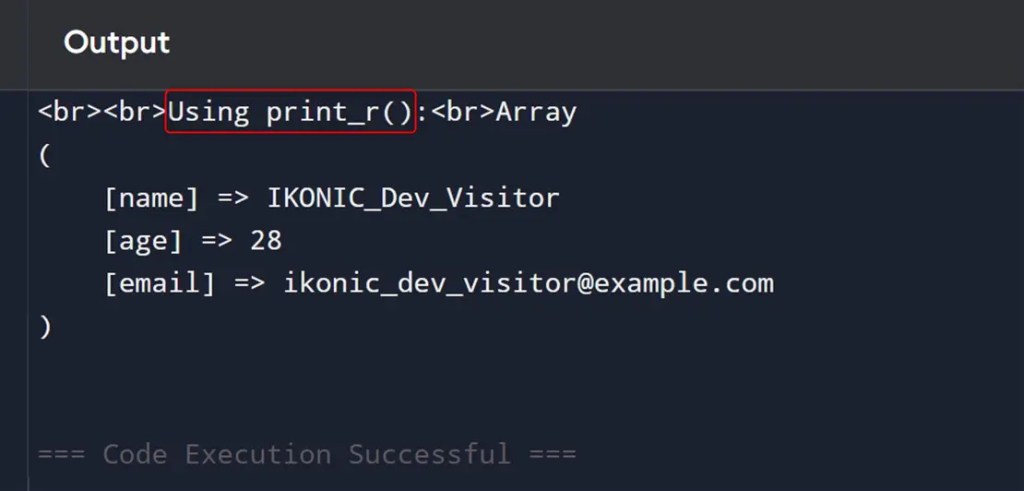
To fix code in PHP, use print_r() to look at what values your stuff has. print_r() is cleaner easier to read, with better for quick inspection.
<?php
// Sample array
$user = [
"name" => "IKONIC_Dev_Visitor",
"age" => 28,
"email" => "ikonic_dev_visitor@example.com"
];
echo "<br><br>Using print_r():<br>";
// Debug with print_r()
print_r($user);
?>
Method 3: Using the Xdebug Tool
When your code is big, use tools like Xdebug to go through each step, look at call lists, and watch how much memory you use. Some apps for your browser or IDE can help you see code errors as you work. Good code fixing is not just about finding what broke. It is to know how your code runs so you stop more problems before they start.

Method 4: Using error_reporting(E_ALL)
If you want to see all errors, set error_reporting(E_ALL) and ini_set('display_errors', 1) while you are working on your code. Make your small tools to see things a bit better. Write what you find in a file so you can check it later. It mostly occurs in PHP CRM Development projects.
Here's a simple example of how to debug PHP code using error_reporting(E_ALL).
<?php
// Enable all error reporting
error_reporting(E_ALL);
ini_set('display_errors', 1); // Show errors in the browser
// Sample code with an error
$number = 10;
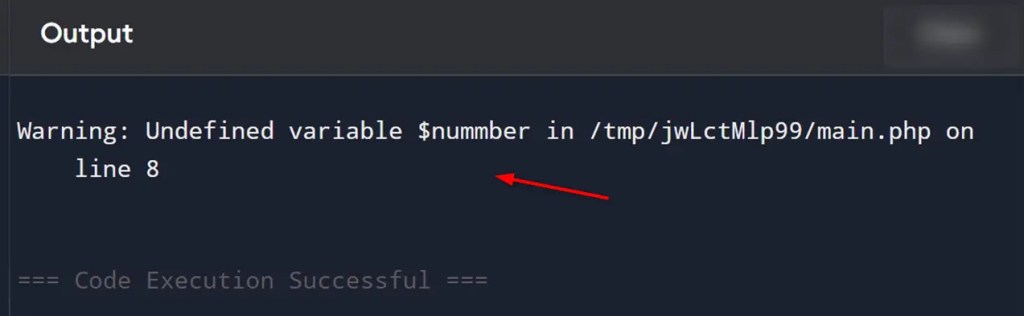
echo $nummber; // Typo! $nummber is not defined
?>
error_reporting(E_ALL) tells PHP to report all kinds of errors, warnings, and notices.
ini_set('display_errors', 1) tells PHP to display those errors on the screen (important for debugging).
Since $nummber is a typo (undefined variable), PHP will output a Notice or Warning like:
This helps you quickly identify and fix issues in your code.
Method 5: Using try and catch Technique
If you run into a problem, use try and catch to catch it and see what went wrong. Here's a simple example to demonstrate how to debug PHP code using the try-and-catch technique. You can also Hire PHP Developers to get PHP QA and Testing Services services:
<?php
function divide($a, $b) {
try {
if ($b == 0) {
throw new Exception("Division by zero error.");
}
return $a / $b;
} catch (Exception $e) {
// Debug message
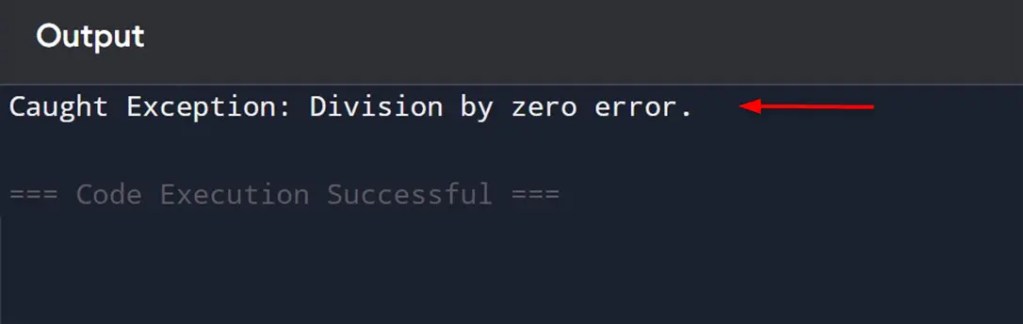
echo "Caught Exception: " . $e->getMessage();
}
}
// Test the function
echo divide(10, 0); // Will trigger the exception
?>
The try block contains the code you want to run.
If an error occurs (e.g., dividing by zero), an Exception is thrown.
The catch block handles the exception and prints a helpful debug message instead of crashing the script.
Best PHP Code Debugging Tools in 2025
Debugging PHP code has become much easier in 2025. The powerful tools that help developers quickly find and fix problems. Xdebug remains a top choice, offering features like stack traces, memory usage analysis, and code coverage reporting. It makes tracking down bugs simpler than ever.
However, there are also other tools in the bucket. Still, PHPStorm's integrated debugger continues to shine with its visual debugging interface, allowing developers to inspect variables and set breakpoints with just a few clicks.
For those working with Laravel or PHP eCommerce Store Development applications, Ray by Spatie has evolved into an essential tool that lets you visualize queries, dumps, and execution flow without disrupting your workflow.
Frequently Asked Questions
How to Debug my PHP Code?
To debug in PHP, you can use tools like Xdebug, a powerful debugger and profiler for PHP. It assists in finding errors and removes them from the code.
How Can I Debug PHP Code in vscode?
To debug PHP code, install the PHP Debug extension in Visual Studio Code. Also, Install Xdebug and configure the php.ini file and finally, add a launch.json configuration file.
How to Debug PHP Code Online?
Use the Xdebug tool to debug PHP code online. Through this, you can inspect variables, set breakpoints and step through code.
Which is the best custom PHP website development agency in the USA?
IKONIC Dev is the best custom PHP website development agency in the USA. The company offers PHP E-commerce Store Development, Outsource PHP Development, PHP QA and Testing Services, PHP Web Development, PHP CRM Development, and PHP API Development services.

Get a Quote
Start Your Affordable Development & Maintenance Plan Today
Get expert development, maintenance, and peace of mind — all at affordable rates. Start your support plan today!
Book a Call


