

May 12, 2025
How to Change Payout Date on Shopify?
In Shopify, changing the payout date has multiple important payment management benefits for the merchants. With the adjusted payout schedule, businesses will be able to improve their cash inflow by synchronizing payment transfers with their accounting timeline, financial forecasts, and various strategies.
This tutorial will explain why businesses need to change payout dates on Shopify. Furthermore, explore all possible steps to change the payout date on Shopify.
Why You Need to Change Payout Date on Shopify?
There are several reasons for changing the payout date on Shopify. For instance, a seasonal business would desire to receive payouts less frequently during slow payout to reduce transaction costs. At the same time, a growing store would prefer more frequent payouts for consistent capital replacement.
Furthermore, strategically changing payout dates can improve a merchant’s bank account balance management, budget accuracy, and accessibility to sales revenue. Furthermore, granting them refined control over their finances and strategic management of their e-commerce operations.
Note: To know more about Shopify Store Development, visit our interesting guide, “How to Change Shopify Store URL.”
Changing Payout Date on Shopify: Step-by-Step Guide
Changing the payout date for Shopify is simple and can be done from the merchant’s Shopify Payments settings. To begin with, make sure you have Shopify Payments set as your payment processor since this option only applies to merchants using Shopify’s payment processing. Let’s change the Payout date on Shopify:
Step 1: Log into Shopify
Launch any web browser on your preferred device and search for the Shopify administrator’s login page; alternatively, you can log in by typing your store’s URL and adding /admin at the end.
Now proceed to enter your login credentials, which include your email address and password, and then you can gain access to this particular page by clicking “Log in”:

Step 2: Navigate to Settings Menu
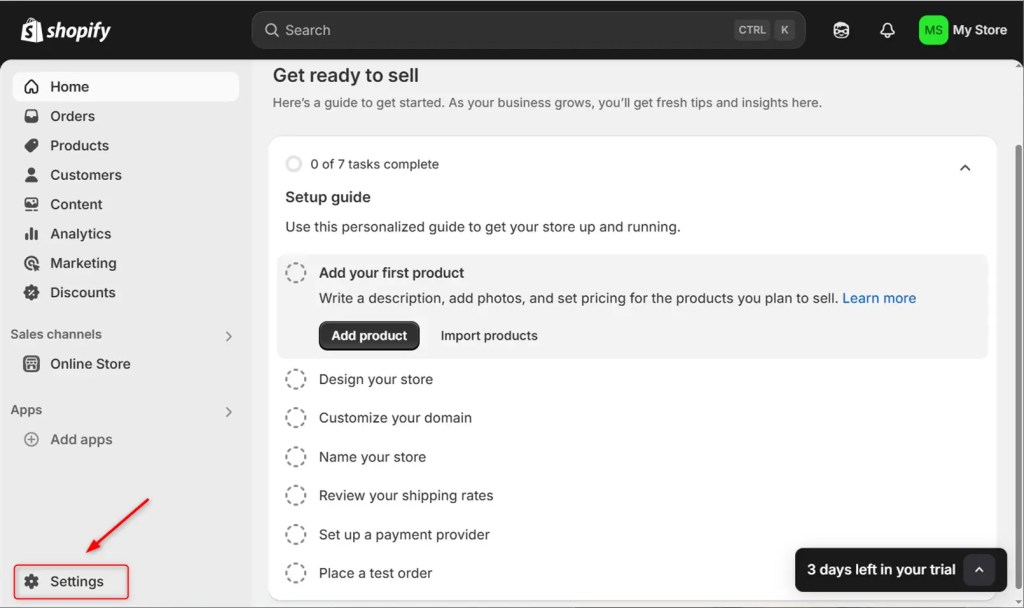
Scroll to the left panel of your Shopify administrator page until you see an image that resembles a gear. This is the “Settings” section. Click the relevant icon to expand the settings:
Note: To explore more about Shopify Development, you can navigate our guide “Why Shopify is the Best eCommerce Platform.”
Step 3: Select Payment
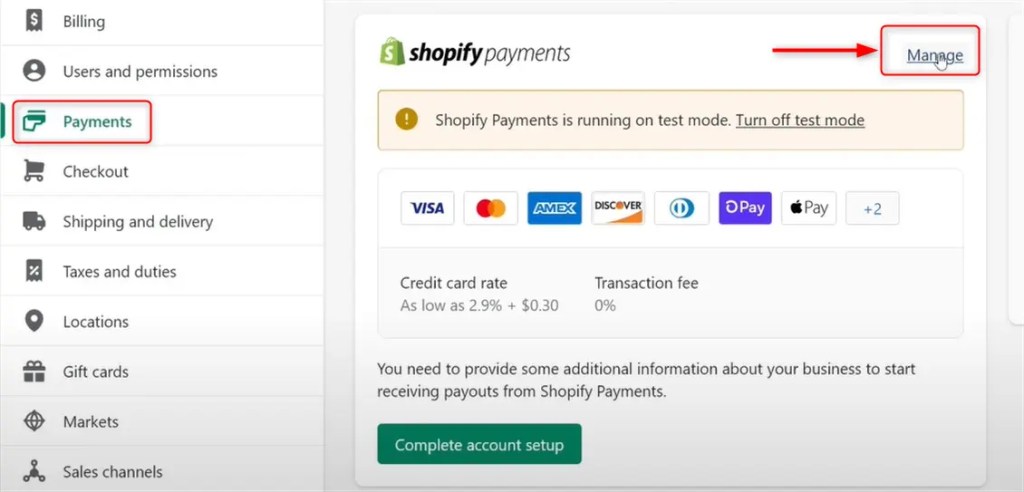
Once you are in the Settings section, search for “Payments” by scrolling further down the menu. It provides you with the ability to manage the configuration of your payment and subsequent payout systems:

Step 4: Manage Payouts
In the payment management section, scroll down to the “Shopify Payments” section. Then, look for the Manage button. Finally, click the button that navigates to the new page:
Note: To learn more about Hire Shopify Developer, you can navigate our guide, How Much Does it Cost to Hire a Shopify Expert?
Step 5: Choose Payout Schedule
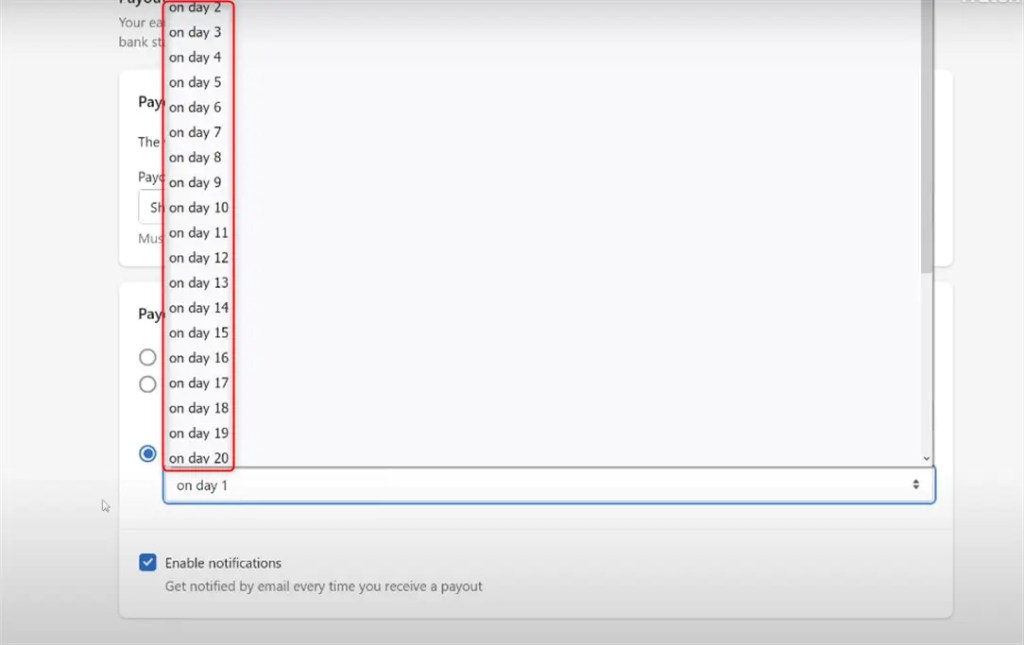
In the “Payout schedule,” several options are given that indicate modifying your payout schedule. You can now decide how often you wish to be paid, such as Every business day, Every week and Every month, as below:

You can choose from the options outlined depending on the preferred frequency. Additionally, you can select precisely which day in the respective week or month you would wish to be paid as below:
Note: To explore more about the Shopify Customization plans, you can navigate our guide “Which Shopify Plan is Best for Dropshipping?”.
Step 6: Save Changes of Payout Schedule
To finish the above steps Shopify “Save” to apply your new payout schedule.
Change the setting to indicate the time a new confirmation message will appear. Make available edits that will allow the correct time to finally reflect when the scheduled “payout will appear.” Now, confirm default settings set for time, meaning the designated changes will be “confirm savings.”
Note: For Shopify App Development, you can Hire Shopify Developer from the IKONIC Dev company in the USA.
This is all from the guide about how to change the payout date on Shopify.
Conclusion
There are several important steps in changing the date you receive a payment. In settings, navigate to Shopify Payments and click on the "Manage" button. You should now be able to set a preferred payout frequency under "Payout schedule" or “Payout frequency”. Remember that the options might differ based on your country and the specific terms of Shopify Payments. When changing the payout schedule siting the processing times and minimum payout limits, if any, is critical.
A few merchants may have to pay a certain sales volume before payouts are automated. Also, keep in mind that some changes in your payout schedule will be effective in the next billing cycle. It could cause issues if not planned well so that cash-flow disruptions can be avoided.
Frequently Asked Questions
Q:1 How effortless can the time be changed when needing to payout schedules?
Typically, using a fixed timeframe from every billing cycle will be more manageable. Once you set up a payout schedule, Shopify will send you an email containing your payout schedule details.
Q:2 Are there any costs involved with changing my payout schedule?
No, Shopify does not incur any additional costs for changing your payout schedule. The alteration is free of charge and may be executed at any time in your administrator console.
Q:3 Can I change the payout schedule with different payment methods?
Generally, the payout schedule is the same for all payment methods. Some payment providers may have their limitations, so it is advisable to contact Shopify Payments or your payment provider.
Q:4 What occurs if the selected payout date is a holiday or weekend?
If your selected payout date is a holiday or weekend, Shopify would generally make the payout on the first business day afterward.
Q:5 Is there a minimum threshold that must be met for payouts?
Yes, there are minimum payout requirements. These requirements differ by jurisdiction and currency. If your balance falls below the minimum threshold, payouts will be suspended until you meet the required amount.

Get a Quote
Start Your Affordable Development & Maintenance Plan Today
Get expert development, maintenance, and peace of mind — all at affordable rates. Start your support plan today!
Book a Call


